Built with Tauri · v1.0.1

A simple, secure best SSH client
Safe for beginners to manage servers

SSH terminal, SFTP file management, and risky-command protection to reduce accidental server mistakes.

Download View features

Current version v1.0.1 · Supports Windows

happy-ssh
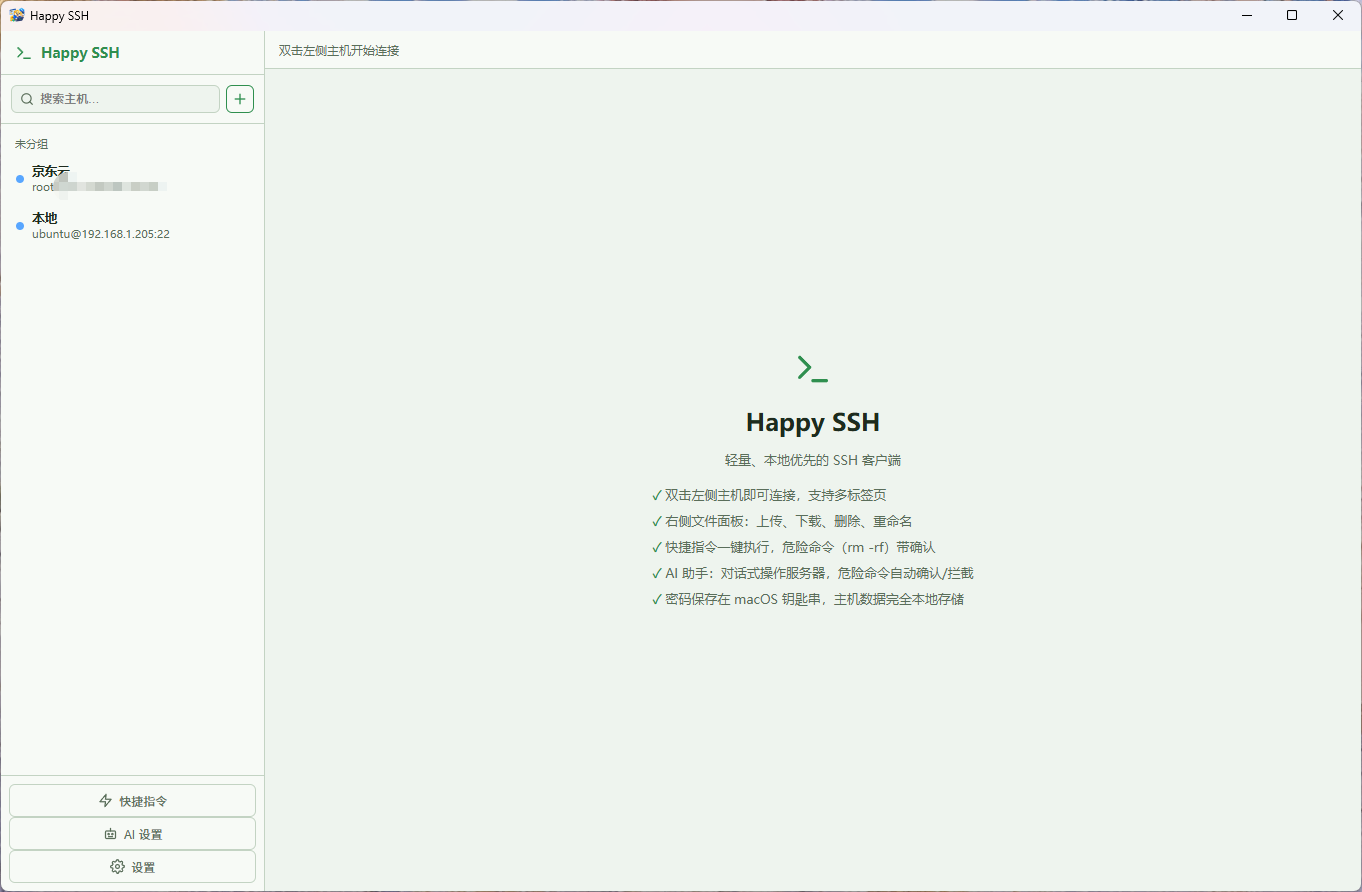
happy-ssh app screenshot

Click the screenshot to zoom in

🛡️

Prevent one wrong command from destroying your server

Ordinary SSH tools cannot recover files after rm. happy-ssh turns dangerous deletions into safe moves — files go to a recycle bin and can be restored with one click.

Comparison

happy-ssh vs traditional SSH tools

Feature happy-ssh PuTTY MobaXterm
Windows
macOS
SSH terminal
Windows/tabs Unlimited Unlimited 12 in free edition
SFTP file management Plugin/extension
Offline Partial
Accidental-deletion protection
Beginner friendly Average Average
Download

Download happy-ssh

Current version v1.0.1 · choose your system and architecture

Windows · x64 v1.0.1
HappySSH_1.0.1_x64-setup.exe About 5.7 MB Direct download
SHA-256:f7ed2062f0d6447030bfaca4b34895a5a7463c501d2c6a32e08cf4849999818b

下载链接有时效,请通过验证码获取。

Changelog

Version history

Every release makes happy-ssh a little better.

happy-ssh v1.0.1Latest 9/15/2026
## Optimization -- AI chat feature, added model loading and model selection functions
Windows · x64 · HappySSH_1.0.1_x64-setup.exe
happy-ssh v1.0.0 9/10/2026
##Increase Internationalization - Chinese - English - Arabic
Windows · x64 · HappySSH_1.0.0_x64-setup.exe macOS · Apple Silicon · HappySSH_0.0.3_aarch64.dmg
happy-ssh v0.0.3 9/5/2026
# Happy SSH v0.0.3 更新日志 ## 🗑️ 回收站:删除的东西可以找回 之前软删除主机会把文件移到回收站目录,但移完之后就「看不见了」,想恢复只能自己去服务器上翻。 现在每一笔移动到回收站的操作都会被**记录下来**,你在软件里就能看到并一键恢复。 - **文件面板右上角多了「回收站」按钮**(软删除主机才有) - 点开后可以看到该主机**所有移到回收站的文件/文件夹**,列出: - 它原来在哪里(移动前路径) - 它现在被移到哪了(移动后路径) - 移动的日期时间 - 每条记录旁边有 **「恢复」** 按钮,点击即可把文件**移回原来的位置** - 也可以**删除单条记录**或**清空记录**(仅清理记录,不会动回收站里的文件) > 用途:误删了文件不用慌,到回收站里点一下「恢复」就回来了。 ## 🛡️ 修复:终端里执行 rm 不再报错 过去软删除主机上执行 `rm`,如果回收站里已经有同名文件(或同名文件夹),会报错: ``` mv: cannot overwrite non-directory '/home/ubuntu/trash/1' with directory '1' ``` 现在**不会再报这个错**了。移到回收站时如果遇到同名,软件会自动给目标名加上时间戳(例如 `1` 变成 `1.20260101-120000`),保证每次都能成功移入,**不会覆盖**回收站里已有的文件。 ## ✅ 附带优化(上次之后积累的改进,一并包含) - 终端里输入 `rm` 相关命令时,确认提示更可靠,转换后的命令不会再出现乱码、被截断的情况 - 文件面板新增**批量「移动到…」**:可以一次选中多个文件/文件夹,在软件里浏览远端目录选好目标,再决定「同名覆盖」还是「同名跳过」
Windows · x64 · HappySSH_0.0.3_x64-setup.exe
happy-ssh v0.0.2 8/29/2026
Added - Three new color skins: soft white, soft green, soft blue - Novice mode adds config: on interception, freeze the window or continue execution
Windows · x64 · HappySSH_0.0.2_x64-setup.exe macOS · Apple Silicon · HappySSH_0.0.2_aarch64.dmg
happy-ssh v0.0.1 8/16/2026
Added - Host memory feature - Host file operations panel - Add usage modes: 1. Pro mode, 2. Novice mode (intercepts risky operations directly) - rm interception: configure what actually runs on rm (e.g. move to a folder) - Plaintext import/export
Windows · x64 · HappySSH_0.0.1_x64-setup.exe macOS · Apple Silicon · HappySSH_0.0.1_aarch64.dmg
More apps

More tools from TiredWork

🔍

Table Universal Search

Search data in Excel / CSV quickly, with fast locating across many files.

View details →
📋

ClipDog

Boost your Windows clipboard: save copy history and improve copying efficiency.

View details →
👁

Eye Care Assistant

Scheduled breaks + eye exercises to protect your eye health and relieve eye strain.

View details →