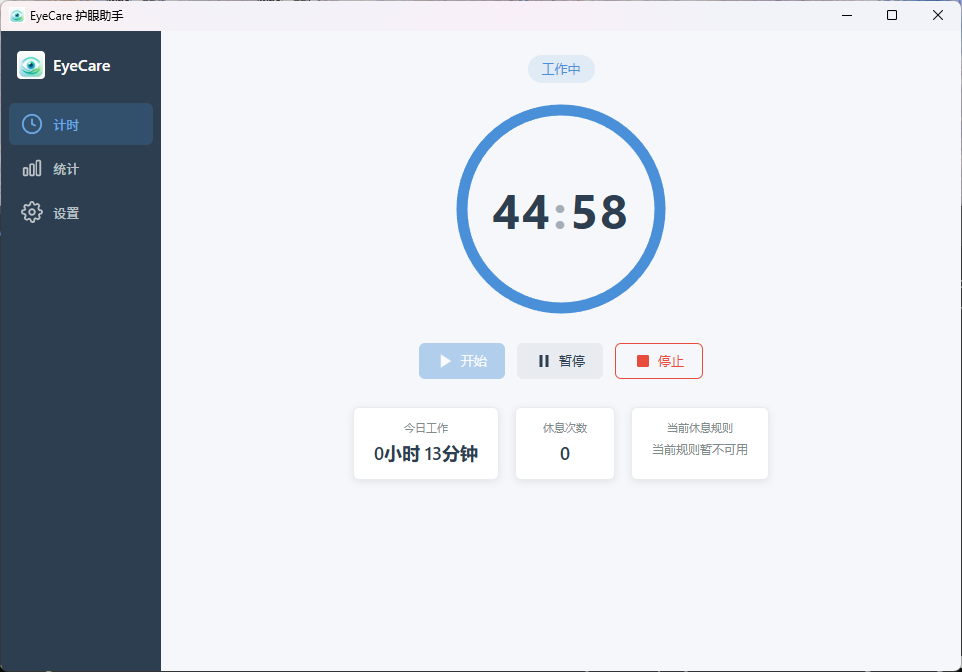
Click the screenshot to zoom in
Eye Care Assistant is a lightweight Windows and macOS eye-care tool that gently reminds you to step away from the screen at the right time and guides you through a set of relaxing eye exercises, relieving eye strain from prolonged computer use.
Click the screenshot to zoom in
Work, study, and entertainment increasingly depend on computers. Staring at a screen up close for long periods causes eye strain, dryness, and reduced focus. Many eye-care apps only remind you to rest. Eye Care Assistant goes further — with scheduled breaks and guided eye exercises, it helps you truly relax your eyes during breaks and build healthy eye habits.
Scheduled break reminders / 20-20-20 rule / Guided eye exercises / Lightweight & power-saving
Customize break intervals and reminders; it gently interrupts at the right time, reminding you to look away and relax your eyes.
Every 20 minutes of screen time, look at something 20 feet (about 6 meters) away for 20 seconds — a simple way to build a regular rest habit.
Follow the prompts through a set of eye exercises: eye movements, near/far focusing, and relaxation exercises to help your eyes relax.
Built natively with Tauri for very low memory usage; it sits quietly in the system tray without disrupting your workflow.
| Feature | Eye Care Assistant | Basic break reminder |
|---|---|---|
| Scheduled break reminders | ✅ | ✅ |
| 20-20-20 rule | ✅ | ❌ |
| Guided eye exercises | ✅ | ❌ |
| Near/far focus training | ✅ | ❌ |
| Runs fully offline | ✅ | ✅ |
| Lightweight & power-saving | ✅ | Average |
Long hours of coding on screen; scheduled breaks relieve eye strain.
Working with documents and spreadsheets; regular breaks protect eye health.
Online classes and homework strain the eyes; build healthy eye habits.
Streaming, gaming, and design — get reminded to look away and relax your eyes.
Long hours of coding require constant screen time, and it's easy to forget to rest. Eye Care Assistant helps developers keep a steady work rhythm with scheduled reminders and eye exercises.
Click to download the installer and complete installation step by step. Works on Windows 10 / 11.
Set break intervals to match your work habits (e.g. every 25 minutes); the assistant gently reminds you at the right time.
During breaks, follow the guided eye exercises; with daily practice your eyes feel more relaxed.
Current version v1.0.0 · choose your system and architecture
8e33ffd92f04b083a5f4374820311b76f4bec8c158493d6a633f5d7639ed5682下载链接有时效,请通过验证码获取。
645f5d7b1b21b8bffeed5c9d6b8f4ce61dd5bdc3345ad5926a89599b951465c4下载链接有时效,请通过验证码获取。
Every release makes Eye Care Assistant a little better.
It is for programmers, office workers, students, and anyone who spends long hours on a computer, helping build healthy eye habits.
The 20-20-20 rule suggests that every 20 minutes of screen time, you look at something 20 feet (about 6 meters) away for 20 seconds. Eye Care Assistant helps you build this habit.
Eye Care Assistant helps build healthy eye habits; it is not a substitute for professional eye diagnosis or treatment.
No. The app runs locally and keeps your data on your computer — nothing is uploaded to the cloud.
You can customize the break interval to match your habits, for example every 25 minutes.
Enter the code in the image (if it is a math problem, fill in the result), then click "Download" to get the installer.